Why relying on one channel is risky
A channel is any place where guests can find and book your villa. Airbnb is one channel. Your own website is another. Relying on just one channel has three big risks.
1. You do not control the rules. Every platform can change its fees, its cancellation rules or how it shows prices. When it does, you have to accept the change.
2. You do not control search ranking. Ranking means where your listing appears in search results. Airbnb says its search looks at things like quality, popularity, price and location (opens in new tab). If your ranking drops, your bookings can drop too, and you may not know why for weeks.
3. You reach only one group of guests. Each platform is stronger with some guests than others. Some travellers always use one site. If your villa is only on Airbnb, those guests will never see it.
None of this means Airbnb is bad. It is a strong channel for villas. The point is to have more than one way for guests to reach you. Our post on whether hotels should list on Airbnb (opens in new tab) shows how Airbnb fits into a wider mix.
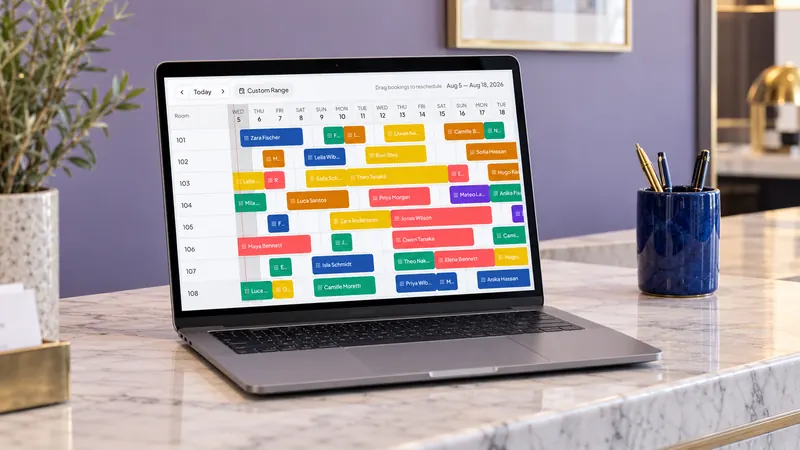
Do this inside Kiyo. Each row in the plan above adds one channel. In Kiyo, you pick the new OTA from the Add OTA list, and its bookings land on the same booking calendar as Airbnb. When one channel gets a booking, Kiyo updates your other connected channels, so your test dates stay safe.
The main types of channels for villas
There are four main types of places to list a villa. Most owners use a mix of them.
Big global OTAs
An OTA (online travel agency) is a website that sells rooms from many properties and takes a commission on each booking. If the word is new to you, read our guide on what an OTA is (opens in new tab). Big global OTAs include Booking.com and Expedia. They reach guests from many countries.
Booking.com has a section for homes and villas. When you register, Booking.com says that for most vacation rentals you choose Homes, then Entire place, then Vacation home (opens in new tab). It also warns that you cannot change the property type later, so pick carefully. Booking.com says registration is free and takes about 15 minutes (opens in new tab).
Regional OTAs
Regional OTAs are strong in one part of the world. In Southeast Asia, for example, Agoda, Traveloka and tiket.com are popular. Trip.com is popular with many travellers from China and other parts of Asia. If many of your guests come from one region, the OTA they use at home matters a lot.
Your own booking website
A direct booking website is your own site where guests book and pay you directly. You keep the full booking value, minus your own payment costs. The catch is that guests have to find it. Most direct guests come back after a first stay, or find you on Instagram, Google or by word of mouth. Our post on direct booking websites for small hotels (opens in new tab) covers the basics.
Social media and messaging
Instagram, Facebook and WhatsApp are not booking sites. But many guests in Asia ask questions there first. A good Instagram profile with a link to your booking page can bring real direct bookings.
How to choose channels for your villa
You do not need to be everywhere. Too many channels at once means more work and more chances for mistakes. Use these three questions to choose.
Question 1: Where do your guests come from?
Look at your last 30 or so bookings. Write down each guest's country. If most come from Europe or the US, a big global OTA is a good next step. If many come from Indonesia, regional OTAs like Traveloka and tiket.com make sense. If many come from China or other parts of Asia, Trip.com may be worth testing.
Question 2: What kind of villa do you have?
- Large villas for groups and families often do well on platforms that let guests filter by bedrooms and private pools.
- Small villas for couples compete with hotels, so a big OTA that shows both can work well.
- Long-stay villas for remote workers or families can do well with monthly prices, both on OTAs and on your own website.
Question 3: How much time do you have?
Each new channel needs photos, a description, prices, house rules and replies to guest messages. If you manage everything yourself, add one channel at a time. Our post on how many OTAs a hotel should use (opens in new tab) explains how to grow the number of channels step by step.
A simple starting mix for many villas looks like this:
| Stage | Channels | Why |
|---|
| Start | Airbnb | Easy to begin, strong for villas |
| Next | One big global OTA | Reaches new guests from many countries |
| Then | One regional OTA for your main market | Reaches guests who book on local sites |
| Always | Your own booking website | You keep the full booking value minus your own payment costs, and you own the guest relationship |
Remember that each OTA charges its own commission. Before you add a channel, read the rate in your contract. Our post on OTA costs (opens in new tab) explains how to compare the real cost of each channel against a direct booking.
Example (made up to show the steps, not a real customer): an owner with two villas in Uluwatu gets most bookings from Airbnb. First, she adds Booking.com, because her last 30 guests came from many countries. After a month of clean calendars, she adds Traveloka and tiket.com to reach guests booking from Jakarta and Surabaya for long weekends. One calendar keeps all four channels on the same availability.
How to add channels and avoid double bookings
A double booking happens when two guests book the same villa for the same night on two different sites. It is the biggest worry for owners who add channels. It usually happens because one calendar did not update in time.
There are two common ways to keep calendars in sync.
Calendar links. Some sites let you copy a calendar link from one site into another. The sites then check each other from time to time. The problem is the gap between checks. If two guests book during that gap, you can get a double booking. Our guide on Airbnb and Booking.com calendar sync (opens in new tab) explains this risk in detail.
A channel manager. A channel manager is software that connects to each OTA directly and updates all of them from one calendar. When a booking comes in on one site, the channel manager closes the dates on the others right away. It also sends your prices and rules to every channel, so you change them once. Our post on channel managers for vacation rentals (opens in new tab) explains how they work for villas.
Whatever you use, follow these rules:
- Use one master calendar. Decide which calendar is the truth. Block dates there, and only there.
- Block owner stays and repairs early. If you or your family will use the villa, block it on the master calendar first.
- Match your rules. Keep check-in time, minimum stay and cancellation rules clear on every channel, so guests are not surprised.
- Check after each change. After you add a channel, open it and check that the calendar and prices match.
A 30-day plan to add your next channel
Here is a simple plan. It assumes you are on Airbnb now and want to add one more OTA and your own website.
Days 1 to 3: Get ready.
- Pick your next channel using the three questions above.
- Collect your best 20 to 30 photos.
- Write down your prices, minimum stay, house rules, check-in time and cancellation rules.
Days 4 to 10: Set up the new channel.
- Register the villa on the new OTA. On Booking.com, choose the right property type, because you cannot change it later. Booking.com says a new property can take up to 24 hours to appear (opens in new tab) after it goes live.
- Add photos, a clear description, the number of bedrooms and beds, and your rules.
- Connect the new channel to your channel manager before you open dates.
Days 11 to 14: Test.
- Open a few dates only.
- Check that a booking on one site closes the dates on the other.
- Ask a friend to look at the listing and point out anything unclear.
Days 15 to 30: Open fully and watch.
- Open all dates.
- Reply to guest messages quickly on every channel.
- After 30 days, count bookings from each channel. Decide whether to keep going, change your listing, or try another channel.
When this first new channel runs well, add your own booking website. Put its link on Instagram, in your WhatsApp profile and in messages to past guests.
Mistakes owners make when adding channels
- Copying the Airbnb listing word for word. Each site has different fields. On a big OTA, guests often look first at bedrooms, beds, bathrooms and facilities. Fill in every field, not just the description.
- Different prices with no reason. If your villa costs much more on one site, guests notice. Decide your prices on purpose, and remember that each channel's commission changes what you earn.
- Different rules on each site. If check-in is 14:00 on one site and 15:00 on another, guests get confused. Keep the same rules everywhere unless you have a clear reason.
- Slow replies on the new channel. A new listing has no reviews yet. Fast, friendly replies help you win the first bookings.
- Never checking results. After a month, count bookings and earnings per channel. Keep what works.
How Kiyo helps villa owners list on more channels
Kiyo is a PMS and channel manager built for independent hotels, villas, guesthouses and hostels. A PMS (property management system) is the software where you see your bookings, guests and calendar. Here is what Kiyo does for owners who want to list beyond Airbnb.
- Connects to 75+ OTAs. This includes Booking.com, Agoda, Expedia, Airbnb, Traveloka, tiket.com and Trip.com. Our post on connecting Traveloka, tiket.com and Agoda (opens in new tab) shows how regional OTAs are connected.
- One calendar for every channel. When a guest books on one channel, Kiyo updates availability on your other connected channels within milliseconds.
- Airbnb connected properly. Airbnb connects by secure login, and you can manage listing settings, pricing, availability, promotions and guest requests from an Airbnb workspace in Kiyo. Read more in our Airbnb channel manager guide (opens in new tab).
- Your own booking website. Every plan includes a direct booking engine, so guests can book you without an OTA.
- Help with setup. The Kiyo team sets up and connects your OTAs with you during onboarding.
Your next step: pick the first new channel from the plan above and see how it would sit next to Airbnb on one calendar.
Plans start from Rp40k per room per month (opens in new tab). Free setup, pay from go-live, 14-day money-back guarantee.
Frequently asked questions
Start with two or three you can manage well, such as Airbnb, one big OTA and your own website. Add more only when the first ones run smoothly.
Airbnb's help page on search lists factors like quality, popularity, price and location, and does not list being on other sites. What can hurt you is blocked dates, slow replies or cancellations, so keep your calendar in sync.
Not always, but it helps. Calendar links can leave a gap between updates, and a channel manager updates your connected channels as soon as a booking lands.
Booking.com and Expedia for guests from many countries, regional OTAs like Traveloka and tiket.com for Indonesian guests, and your own booking website shared on Instagram and WhatsApp.
In the channel manager, you sign in to your Airbnb account and approve the connection. Then you match each Airbnb listing to a room, and check prices and dates on a test date. With Kiyo, our team does this with you during onboarding.
Yes. In Kiyo the villa is one unit with one calendar, and the two options are rate plans. A booking on either closes the villa for those nights.
 Add Kiyo to your preferred sources on Google