What a cloud PMS is, and what it is not
"Cloud" here means the system is hosted for you. You log in through a website. You do not install a program on one front-desk PC and hope that PC never fails. A new receptionist can be given a login on their first morning. An owner can open the same calendar from another island.
It is not a second copy of Excel in an email. If two people can edit two different files, you do not have a cloud PMS. You have two versions of the truth. The comparison with a spreadsheet is covered in PMS vs Excel (opens in new tab); the short version is that a live calendar has to be shared, not attached.
It is also not, by itself, a promise that the system works with the internet switched off. A cloud PMS needs a connection to show the live calendar and to send availability to OTAs. If your line drops, you need a simple rule for what the desk does until it comes back. Do not buy on the hope of a hidden offline mode unless the vendor has shown you one on a demo.
And it is not automatically a native phone app. Many good systems, including Kiyo, are used in the phone browser. That can be enough for a calendar check, a walk-in, or an arrival list. It is not the same as an app you install from a store. Ask to see the actual screens on a phone before you decide.
Why small Indonesian hotels use a cloud system
Three jobs come up again and again.
The owner is not always at the property. You may live in another city, or travel between two buildings. If the calendar is only on the office computer, every question becomes a phone call. A cloud PMS lets you see today's arrivals, a new WhatsApp request, and whether a room is still open, from where you are. That is the practical answer to owner dependency (opens in new tab): the record is shared, so the desk can answer without calling you for every date.
The desk runs on a phone as much as on a computer. In a 10-room guesthouse, there may be one laptop, or none at night. If the receptionist can open the calendar in a browser on the phone they already carry, they are more likely to enter a walk-in before they hand over the key.
Local channels and Bahasa support have to travel with the system. A cloud tool that cannot connect Traveloka or tiket.com, or that only supports staff in English, still leaves you with a manual tab. The official TERA partner page (opens in new tab) is the starting point for Traveloka itself; your PMS should be able to connect to that workflow rather than leave it as a separate tab. The guide to choosing a PMS for a small hotel in Indonesia (opens in new tab) is the place to test those points. The cloud part only helps if the product itself fits Indonesia.
Price should be clear in Rupiah, not only in a foreign currency you have to convert each month. Kiyo starts from Rp40k per room per month (opens in new tab). Free setup, pay from go-live, 14-day money-back guarantee.
Using a cloud PMS on your phone
"Works on a phone" should mean something you can test in five minutes.
Open the vendor's demo on the phone you actually use, not on a large desktop screen. Then try the jobs you will do away from the desk:
- See who arrives and who leaves today.
- Check whether a room type is open for a date a guest just asked about on WhatsApp.
- Enter a walk-in, or at least walk through that screen, and see that the room is then held.
- Read a booking note, such as a late arrival or a requested extra bed.
Use the phone browser for this test, unless the vendor has a live staff app they can show you. If buttons are cut off, if the day view takes too many taps, or if staff cannot switch the screens to Bahasa Indonesia, you have learned something cheaply.
For cleaners, some systems offer a simpler view in the phone browser, often on a higher plan. If you need that, ask to see it, and ask which plan it sits on. Do not assume the owner calendar and the cleaner list are the same product.
What to do when the internet is slow or drops
This is the honest part. A cloud PMS is only as live as the connection in front of you. In a town with a weak line, or on a property where the office Wi-Fi fails in the afternoon, you need habits, not slogans.
- Keep a backup way to reach the internet, such as a phone hotspot, for the desk.
- Do not confirm a WhatsApp or walk-in stay until you can open the live calendar and enter it. If you cannot open it, say you will confirm in a few minutes, then do so.
- Do not run a second "just in case" spreadsheet that staff start treating as the real calendar. That is how a double booking starts.
- If the connection fails in the middle of check-in, finish the guest kindly, then enter or update the stay as soon as the line is back, before you take the next booking.
- Ask the vendor what happens if an OTA connection fails: who is told, and how.
Kiyo, for example, notifies the property and alerts the Kiyo team if an OTA connection fails. That is a connection alert, not a claim that the system keeps working without internet.
A made-up example makes the habit clearer. Sari owns a 10-room guesthouse near Labuan Bajo. She is in Denpasar on a Tuesday. At 16:00, the receptionist messages her: a guest at the door wants two nights, starting today, for Rp1.2 million. The office Wi-Fi is down. The receptionist turns on a phone hotspot, opens the cloud PMS in the browser, sees that one room is still free, enters the walk-in, and only then takes a deposit. Sari can open the same booking from Denpasar. If they had said yes first and planned to "update the laptop later", a Traveloka booking could have taken the same room while the Wi-Fi was down. The habit does not need new hardware. It needs a backup hotspot, a calendar that opens in the phone browser, and a rule that "yes" is only said after the stay is entered.
Access, roles and a basic level of safety
Because a cloud PMS is reachable from more than one place, access matters more than it did on a single office PC. Staff logins can open guest names and phone numbers, which are personal data under Indonesia's Personal Data Protection Law (UU No. 27 of 2022) (opens in new tab). That is a good reason to give each person only the access they need, and to turn it off on the day they leave.
Look for named logins, not one shared password written on a sticky note. A good setup lets you give each person only the tabs they need. Typical roles are owner, manager, staff and cleaner, with the cleaner limited to housekeeping. You should be able to turn a person's access off on the day they leave.
Ask about two-factor authentication (a code from an authenticator app as well as a password). It is a small step that protects billing and payout access in particular. Kiyo offers authenticator-app 2FA for every user, and billing or payout access is off until it is granted, which also requires 2FA.
Also ask who can change dates, prices and cancellations, and whether the booking keeps a history of those changes. That history is what you check when a rate was altered and nobody can remember why.
None of this needs a dramatic "bank grade" claim. It needs a login for each person, a way to restrict money tabs, and a record of changes on the booking.
Common mistakes when buying a cloud PMS
- Judging the product only on a desktop demo. Open it on the phone the desk will use.
- Assuming it works offline. Ask what staff should do when the line drops, and practise that rule.
- Leaving one shared login so you cannot tell who changed a booking.
- Ignoring Bahasa and local OTAs because the cloud brochure looks modern.
- Keeping a parallel spreadsheet "for safety" after go-live.
- Forgetting support hours in Indonesian time. A cloud vendor in another time zone can leave you alone at 21:00 WITA.
How Kiyo's cloud PMS works
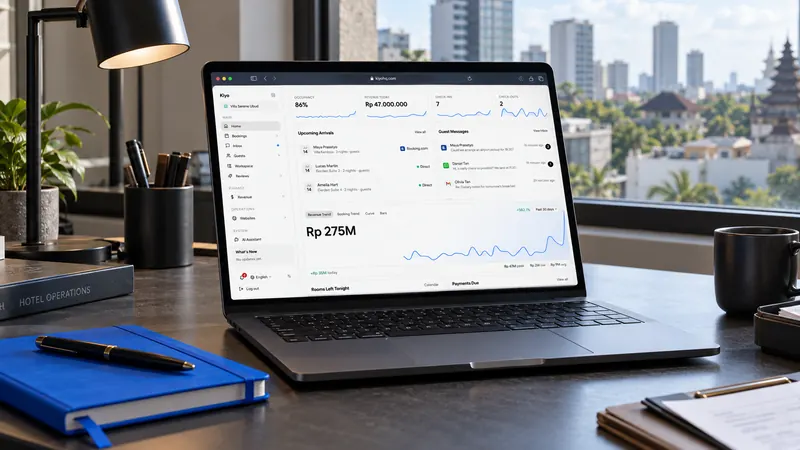
Kiyo is a cloud PMS and channel manager for independent hotels, villas, guesthouses and hostels. You open it in a browser, including on a phone. There is no separate native staff app. Staff screens are available in Bahasa Indonesia, including a cleaner view in the phone browser on the Business plan.
Everyone works from the same live calendar. Walk-ins can be entered at the desk. When a room is booked, it locks on all connected channels within milliseconds. Kiyo connects to 75+ OTAs, including Traveloka and tiket.com. If an OTA connection fails, the property is told and the Kiyo team gets an alert.
Each person can have a role and tab-by-tab access. Cleaners see housekeeping only. Authenticator-app 2FA is available for every user. Billing and payout access is separate, off by default, and needs 2FA before it can be granted. Every booking has a change history for dates, price, status, payment and cancellation.
The Kiyo team sets the system up with you, in person in Bali or by video call elsewhere. Each property has a WhatsApp group. Normal support runs from 07:00 to 19:00 WITA, with 24-hour cover for system failures.
Plans start from Rp40k per room per month (opens in new tab). Free setup, pay from go-live, 14-day money-back guarantee. For a wider fit check, read is Kiyo right for your property (opens in new tab).
Frequently asked questions
It is as safe as the logins you issue. Give each person their own access, turn it off when they leave, and switch on 2FA, especially before anyone can touch billing. Do not share one password at the desk.
You can do a lot in a phone browser: today's list, a date check, a walk-in. A simple computer still makes long setup and end-of-day checks easier. Try both in a demo.
You will not see the live calendar until the connection is back. Use a phone hotspot if you can, and do not confirm a new stay until you have entered it. This is a working rule, not a hidden offline mode.
Not always. Some tools are only a calendar. Kiyo includes a channel manager with 75+ OTAs, including Traveloka and tiket.com. Ask each vendor what is included in the price.
No. If you use housekeeping on the Business plan, the cleaner view works in the phone browser. Ask to see that screen if it matters to you.
 Add Kiyo to your preferred sources on Google